 Doppelmaker
Why a rig
Walking around someone with a phone is the quick way to scan a person, and fine for a rough avatar. It isn't good enough for a dress form. The hand-held phone slowly loses track of exactly where it is, and the person sways while the phone is behind them with nothing to notice. Both errors end up in the shape.
The rig fixes both. The phones don't move, so their positions are measured once and stay exact. The person turns slowly on a turntable, so every side is seen, and two phones watching from different directions catch every lean and breath so Doppelmaker can take them out. How it works explains the reasoning in more depth.
Layout
- Phone A faces their front, lens at about navel height, tilted up 10°.
- Phone B is at their side, 90° around from A, lens 15–25 cm above their shoulders and tilted down 12°, so it can see the tops of the shoulders.
- Both about a metre from the turntable centre (0.9–1.2 m), in portrait, with cases off, on right-angle USB-C chargers: LiDAR recording warms a phone.
- Exact heights and angles don't matter, and neither the floor nor the turntable is ever measured: everything is relative to the phones themselves and to the subject. The calibration target measures where each phone is relative to the other.
A session
- Calibrate (Studio's Rig page, once, kept until a phone moves). Hold the calibration castle where both phones can see it. Studio shows both views live and takes a snapshot from both phones at once each time you click; move the castle between snapshots. About eight is enough, and Studio says when the phones are measured well.
- Record the empty room (Rig page, kept with the calibration). Three seconds with nobody in either picture, lights and room as they'll be for the scan. This is the background the outlines are cut against, and it's worth several millimetres of accuracy.
- Scan. The subject steps on, facing phone A, arms a hand's width from their sides. Turn steadily: anything from about 20 to 60 seconds a turn works, so a motorised turntable at its usual speed is fine. Studio measures how far the subject has turned from the phones' depth and says when it passes 750° (two turns plus overlap). Both phones start together when you click; the recordings arrive on the Mac by themselves.
- Check. Studio shows whether the scan is good before they step off: how much they moved, how well the views agree, any part that wasn't seen.
What makes a good scan
Clothing and hair
- Close-fitting, matte, mid-tone clothing, ideally what the garments will be fitted over. The form follows whatever they wear: loose fabric makes a loose form.
- Tie hair up above the neck. Hair over the shoulders becomes part of the outline.
- Arms a hand's width out. An arm against their side hides that side from both phones.
The room
- Even light. No strong window or lamp directly behind them in either phone's view.
- Contrast behind the subject. A background that isn't the colour of their skin or clothing gives the sharpest outlines. A plain dark or saturated backdrop behind each phone's view is the simplest fix where Studio reports weak contrast.
- Leave the room alone after the empty-rig recording: same lights, same doors. Re-record it if anything changes.
What doesn't matter
- Shadows, clutter and anything more than a quarter of a metre behind the subject: the LiDAR rules it out by distance.
- People or pets moving a metre or more behind the subject. Doppelmaker notices them and ignores those frames' outlines where they cross.
- Markers: optional. Small printed stickers on bony places can help tracking a featureless shape, but on a person the result is the same without them.
The person
Stand naturally, weight on both feet, eyes on a fixed point. Breathe gently and evenly. A little sway is expected and removed; a deep breath or a shifted foot is noticed and reported.
Printed parts
Studio generates every printed part of the rig, sized for the phones you use. Each comes as a print-ready STL, and the two-colour parts as a Bambu Studio project.
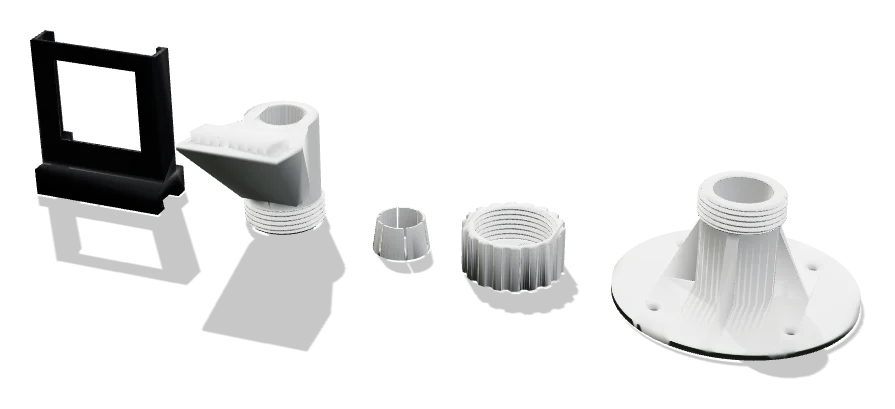
| Part | Qty | What it's for |
|---|---|---|
| Floor socket | 2 | Holds each mast upright, screwed to a board. |
| Collet and cap | 4 each | A threaded clamp that grips the mast: one at each socket, one under each phone head. |
| Phone head A and B | 1 each | Slides on the mast and clamps at any height; A tilts up 10°, B down 12°. |
| Phone cradle | 1 per phone | Holds the phone (case off) and slides onto the head's dovetail. One for every LiDAR iPhone, 12 Pro to 17 Pro Max, regular or Max; print the ones for your phones. Both heads take any of them, and the two phones don't need to match. |
| Calibration castle | 1 | Two colours, 15 markers. Measures where the phones are at the start of every session. |
| Test target | 1, optional | A shape of exactly known size, scanned like a person to check the whole chain. Two sizes: for 330 mm and 256 mm print beds. |
| Body marker sheets | optional | Printable sticker sheets (PDF) for tracking help. |
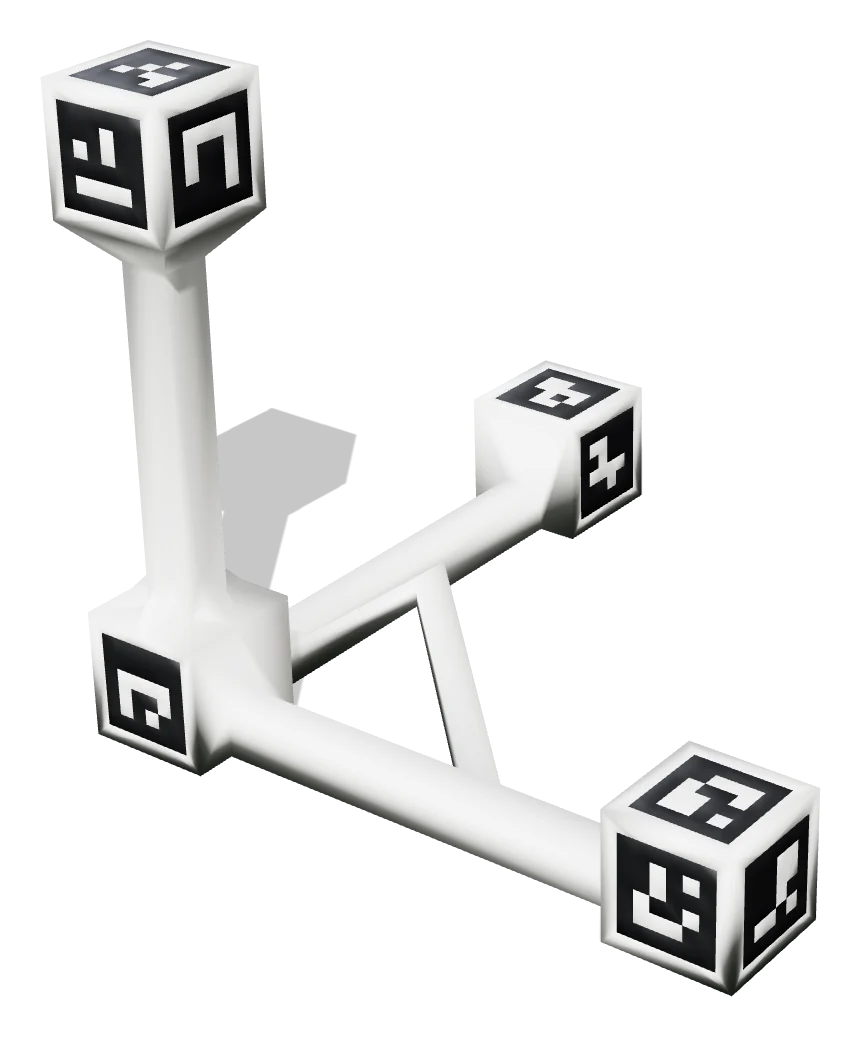
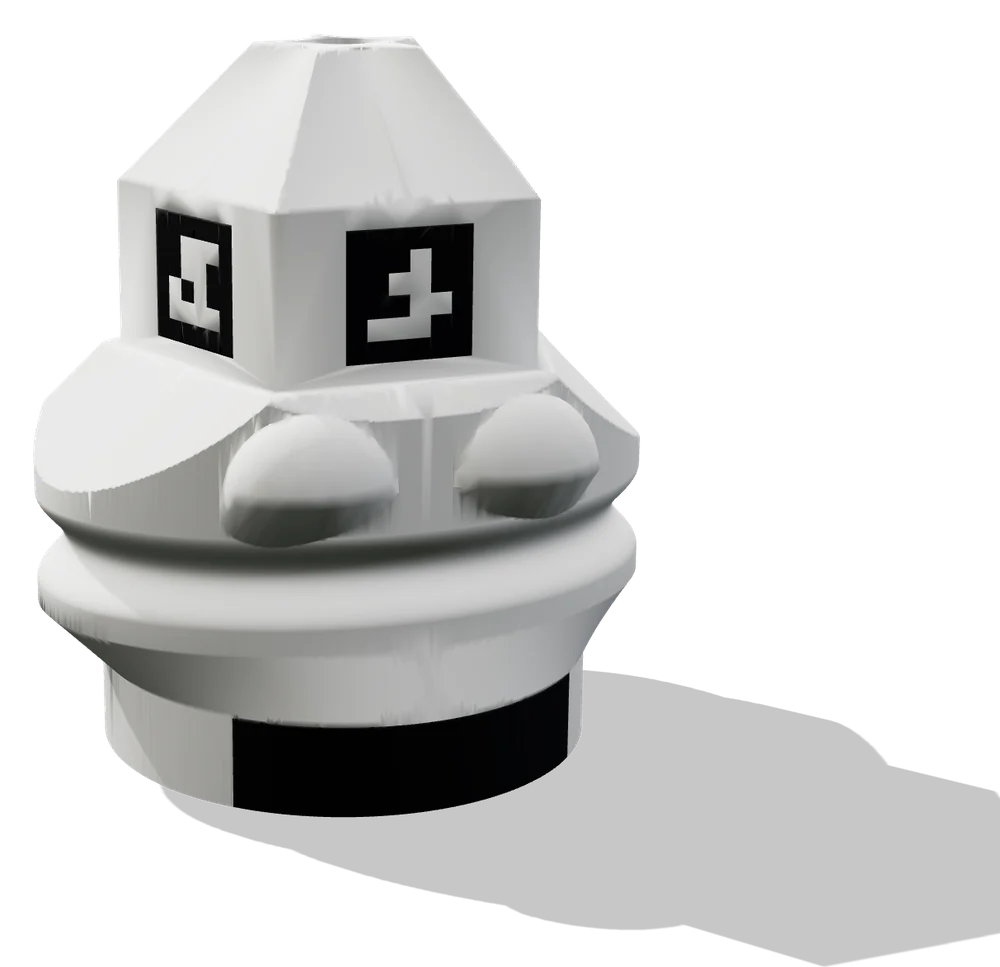
Print in PETG or PLA. The castle and target print in two colours (white and black) on a multi-material printer, and their files already set finer layers where there are threads.
Hardware to buy
- Two masts: 3/4-inch EMT electrical conduit, about 1.8 m each, cut with a tubing cutter.
- A board joining the two floor sockets, for example 3/4-inch plywood 150 mm × 1.8 m, so the masts stay at right angles.
- Eight wood screws (#10 × 3/4-inch flat-head) for the sockets.
- A turntable rated for a person's weight, turned by hand or by motor, slowly and steadily.
- Two right-angle USB-C cables and chargers.